
What is an ePDF?
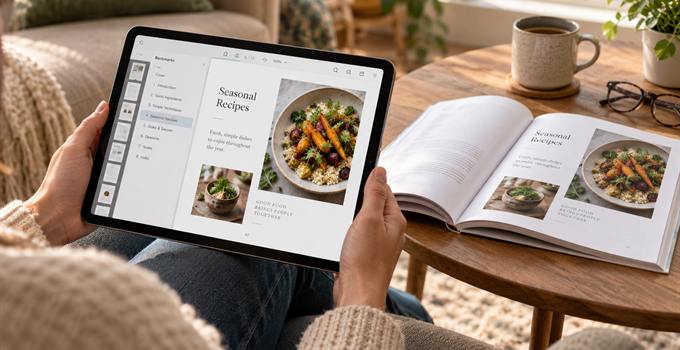
People see the word "PDF" and assume there is only one kind. Which is technically true. But the PDF we send to print and the PDF you sell from your website serve two very different purposes.
An ePDF is made to be read on a screen, not printed and bound into a physical book. Just as you want everything in print to stay exactly where you put it, you want the same on screen: the fonts you chose, columns that don't move around, pagination you can rely on. So yes, an ePDF is just a PDF. It's just that it has a digital purpose rather than a print-ready one.
Both PDFs come from the same book
The print PDF and the ePDF usually come from the exact same set of professionally formatted pages. It's only what happens to them afterwards that's different.
A print PDF is prepared for the printer. This means exact page sizes, bleed, color settings, high-resolution images and margins allowing for the binding.
None of that matters for an ePDF. We're preparing this file for a screen. There is no physical trimming or folding. It just needs to be a sensible file size, with clickable links and navigation built in. Unlike the print interior file, it will also typically include the front cover. Same book. Same design. Prepared for a completely different job.
A print PDF doesn't make a good ePDF
Of course you could just open an ordinary print PDF on a computer or tablet. But that doesn't necessarily mean it will be pleasant to read there.
Printed books are physical objects. Inner and outer margins vary. Blank pages get added to push chapter start positioning. Page numbers are often placed in outer corners so they're optimal when you're holding the book.
On a screen we need to revisit these decisions as you view single pages. Blank pages can be removed. Margins can be made more symmetric. We add navigation so the reader can press a button to jump straight to a chapter rather than aimlessly scrolling through hundreds of pages.
Contents lists, websites, email addresses and other useful references can then all be made clickable. We just make the whole file behave like it was intended for digital viewing. Rather than opening the print file on a screen and hoping for the best.
Fixed layout is sometimes what you need
The big difference between an ePDF and a reflowable ebook is the ePDF doesn't change. With a normal ebook, the reader can make the font bigger or smaller and text then rearranges itself to fit the screen. That's great for novels and anything else that's straight text.
But an ePDF does the opposite. The page stays exactly where you put it. This can be really important for recipe books, workbooks, illustrated books, photography books, children's books and more complicated nonfiction. An image may need to sit beside a particular paragraph. A table might need to stay with its heading. An exercise needs to remain beside the instructions explaining it.
A children's picture book is the clearest example. Open the ePDF on a tablet and the reader sees exactly the same pages as they would see in the printed book. Text is in fancy fonts, wrapped round images, overlaid on bits of design. You don't expect the words and pictures to suddenly move around depending on the device which happens to be opening it.
The text is still real text
It's worth mentioning that the layout being fixed doesn't mean each page is just a photo snapshot. Text is still real, selectable, searchable text. We embed the fonts into the PDF too, so pages don't suddenly show in Arial just because somebody doesn't happen to have your particular fonts installed.
We do treat the images differently though. A print file needs lovely big high-res images because it's going to a printing press. When an ePDF is being opened on screen you want the images to look good but also open and render quickly. So we will optimize all the images to bring the file size down as much as possible, while keeping everything looking nice and sharp.
Selling or sharing an ePDF yourself
This is where ePDFs are particularly handy. You can simply put one up on your website or attach it to an email. They're very useful for advance copies if you want reviewers or other people to see the book before the finished edition is available.
For books where layout is important this is a great alternative to having the big ebook stores sell a fixed-layout epub. Amazon, Apple Books and the like can distribute those for you. But they'll typically keep at least 30% of the sale price, sometimes a lot more.
There are a couple of drawbacks
The main one is phones. A page designed at book size might look great on a computer or tablet. But try to squeeze the entire thing onto a phone screen and suddenly it's all tiny and illegible. For something like a novel, where somebody may sit and read for hours, that simply won't work. For a little kids book or cookbook it might be fine.
One other consideration with PDFs is security. Understandably, authors worry that they could get shared around. The truth is while you can add passwords and restrictions, that can in reality cause more problems than it's worth. There isn't really a foolproof way to secure an ePDF without giving more hassle for legitimate readers. For an advance copy or review version, adding something like Not for sale and asking readers to keep it to themselves is what we would recommend.
Do you need an ePDF?
Really, it all comes down to the kind of book you've made and what you want to do with it. If it's mostly continuous text and you're producing a proper ebook edition, then a reflowable ebook is usually what makes sense. If it's a design highly dependent on layout where you've spent hours getting images, text, tables and everything else sitting exactly where you want them, an ePDF ensures the digital version keeps that design.
And because we make an ePDF from the same professionally formatted pages as the print book, this isn't something we're designing from scratch. We adapt the existing PDF for screen, process the images, add all the other useful digital bits for links and navigation, then give you a file that's ready to sell or share. You can read more about our ePDF design service, or about our nonfiction book formatting and children's book design if you're still at the earlier stage.