
Can AI design my book cover?
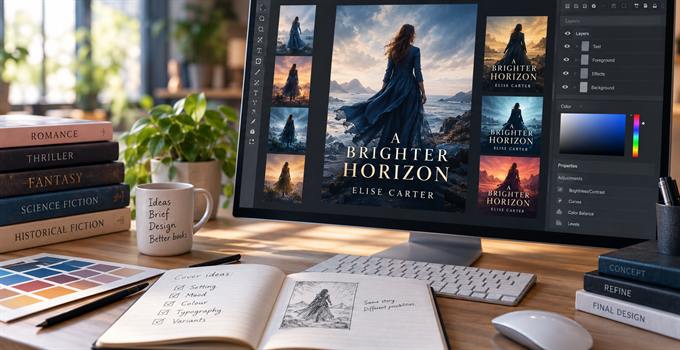
Yes, and no. Sure, AI has changed the way we design book covers. And in most cases for the better. It has become a powerful tool when creating a cover. By enabling us to offer authors more for less. We can mock up ideas that would once have meant hours of searching, compositing and retouching, before deciding against them. Now we can get a rough idea in minutes and decide if it works.
But it's still just a tool, just like Photoshop is a tool. So everything depends on who's using it. It's up to them to know what to ask for, what to keep, what to change and, ultimately, what a strong cover actually looks like.
AI makes custom art accessible
Creating an exact scene from a book used to be tricky. We would place a stock photo backdrop, overlay a road from another image, maybe layer on a car we got from elsewhere. Then it was a case of blending, adjusting light and color, playing with contrast, tweaking focus and perspective until it finally looked like it all worked together.
Now, of course, at the end of all this you could create something truly impressive. But it was seriously intensive work, and you would always be limited by the source images you had available.
At the other end of the spectrum, a fully commissioned illustration can be something truly spectacular. You are in no way limited by what already exists, and an experienced illustrator will bring ideas to an image that you would simply never have dreamt of. They can shape the mood, exaggerate or simplify details, build in symbolism and create a whole new visual world around your book. But sadly for many self-publishing authors, the cost involved to achieve this level of artwork is simply a non-starter.
AI has opened up this space. A landscape, character, mood or moment can now be generated with a level of specificity that would once have been completely impossible. It will never be the same as a fully considered piece of original artwork, but for self-publishers it can provide an increasingly good compromise without the cost.
Someone still has to design the cover
Most authors know what they want their book to say. They then approach us with bits and pieces of ideas about how the cover might express it. Our job is to take all that input as a starting point and make it work visually. Maybe we use AI to help us build a scene or develop the features of a character, but the finished cover is still something that needs to be put together and 'designed'.
That means thinking not only about the genre, audience and competition, but the first impression of the design, the hierarchy of titles and the layout at reduced thumbnail sizes. It means thinking about whether the cover still works in grayscale and on a tiny e-reader screen. Judging when an image is impressive but totally wrong. Clocking when simpler has more impact.
Ask an AI tool to create a cover for you and the results won't consider any of this. What appears on screen may look technically impressive but is often utterly generic and falls flat. But use the tools as one part of a properly directed design process and it does not have to look like that at all.
AI lets us explore more ideas
One of the biggest changes for us has been the freedom to try more directions. We were never great believers in producing several covers simply so an author could choose between them. If we thought one idea really worked, forcing three weaker variants for the sake of showing multiple solutions really didn't seem particularly helpful. Equally, fully fleshing out several different concepts was hugely time consuming and frankly unaffordable for most self-publishers.
Now we can explore multiple ideas so much more easily. We can simply throw together a rough mock-up to make the point of how something does or doesn't work. We can show the author variants they might like to see, just for reference. We just have so much more freedom to experiment, without every experiment turning into hours and hours of Photoshop time, only for us to dump 5 ideas out of 6.
A brief is only the starting point
We had an author come to us recently, she described the concept of a woman surrounded by rippled water with her dancing in the middle. Put only that description into an image generator and the woman was delicate and petite, surrounded by lots of aquatic shades. But the book itself is about domestic abuse. This woman is a survivor, stamping in the water, causing the ripples. We didn't want a specific generated face or distinctive clothes. The woman needed to stand for the author without looking too much like one particular person.
Then there was the color. The palette felt so flat and muted. We needed a colorful uprising. But push the colors too bright and it starts feeling far too playful.
None of these decisions were in any brief. They came from us digesting the book, understanding what the author was trying to express and working through the possibilities. AI made that process much faster and gave us far more freedom to explore. It simply cannot make any of those decisions.
The front is only the start
But an impressive front design is still a long way from a print-ready cover layout. A full cover is a PDF showing the front, spine and back of the cover constructed on the right template for that particular book.
The back design needs to work with the front, while fitting in the synopsis, maybe a short bio and photo, the barcode and publisher information. The spine depends on the page count and paper stock, so the design needs adapting depending on its width.
Then there's the typography. Titles and author names need to be set using licensed fonts and kept as vector artwork rather than part of a generated image. This lets us adjust spacing, alignment and scale everything properly, and carry the same lettering through elsewhere.
Finally there's all the file export settings. Important elements need to sit inside safe areas, while backgrounds have to extend through the bleed. Color on a screen and color in print are not the same thing either. Screens display color in RGB using light, while commercial printing generally uses CMYK inks. So bright colors that look incredibly vivid on screen cannot be reproduced in exactly the same way on paper, while darker areas can lose detail or become muddy looking.
The final file also has to meet the printer's requirements for image resolution, fonts, bleed, trim, page dimensions and PDF output. A cover can look beautiful on screen and still not be ready for a press.
A key tool in the designer's toolkit
Yes. AI can now do a great deal for book covers, and we are glad to have it. It has made really detailed artwork available to many more authors, it lets us explore ideas much more freely and has widened what we can create within a realistic self-publishing budget.
But this same tool can produce something generic or something genuinely distinctive. The difference is knowing what to ask for, recognizing what is working, spotting what is not, understanding the book and knowing where the idea could go next.
That is really the point. AI has not replaced good cover design. It has made good cover designers more capable. In experienced hands it gives us more possibilities, more freedom to explore them and more ways to turn an author's idea into something that works both creatively and technically.
Our job is still to understand what you want your cover to communicate and use the best tools available to make that happen. If you would like us to do that for your book, you can read more about our book cover design services.